
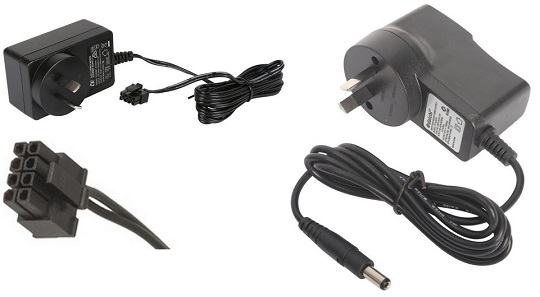
What Is the NBN Power Cord?
The NBN power cord is a dedicated 12 V DC power adapter (usually rated at 2.5 A) with an 8‑pin Molex‑style connector. It supplies power to the NBN Fibre‑to‑the‑Premises (FTTP) Network Termination Device (NTD), the box that terminates the fibre line inside the home. Because the cord is considered NBN property, it must remain at the address when the premises change hands.
Key Characteristics
| Feature | Detail |
|---|---|
| Output Voltage | 12 V DC |
| Output Current | 2.5 A (typical) |
| Connector | 8‑pin Molex‑style plug that mates directly with the NTD |
| Compatibility | Models such as Arris CM8200, Cisco, and other NBN‑approved NTDs |
| Ownership | Property of NBN Co.; must stay with the service location |
Where to Find Replacements
- Electronics Suppliers: Campad Electronics, Wiltronics, Aus Electronics Direct.
- Online Marketplaces: eBay Australia, Amazon Australia (search “NBN 8‑pin power adapter” or “12V 2.5A NBN power supply”).
- ISP Support: Most ISPs can arrange a genuine replacement or direct you to an approved vendor.
When purchasing, verify that the voltage, amperage and connector type match the original specification.
Why People Lose Their NBN Power Cord
Common Reasons
- Misplacement During Moves: Cords are often tucked into boxes, forgotten in storage, or left behind when relocating. The NBN power cord should not be removed from the original address.
- Accidental Disposal: Tangled with other cables, the cord can be mistaken for e‑waste and thrown away.
- Pet or Rodent Damage: Chewed or gnawed cords become unusable and are discarded.
- Electrical Surges or Physical Impact: Power spikes or accidental drops can damage the adapter, prompting replacement.
- Confusing Similar Cords: Many chargers share a similar appearance, leading to the NBN cord being packed with unrelated devices.
Solutions for a Lost or Damaged Cord
| Solution | How to Implement |
|---|---|
| Contact Your ISP | Request a genuine replacement or obtain instructions for an approved third‑party part. |
| Check the Manufacturer | Identify the NTD model (e.g., Arris CM8200) and order a replacement directly from the maker’s support site. |
| Purchase a Compatible Third‑Party Adapter | Ensure the new unit is 12 V DC, 2.5 A, and has the exact 8‑pin connector. Reputable Australian retailers stock these items. |
| Use a Universal Adapter | Select a universal power supply with adjustable voltage and interchangeable tips, set to 12 V and 2.5 A, and install the correct 8‑pin tip. |
| Buy from Online Marketplaces | Verify seller reputation, read product specifications carefully and confirm the connector type before purchase. |
Always double‑check the rating label on the NTD to avoid mismatched voltage or current, which can damage the device or cause safety hazards.
Best Practices to Prevent Future Loss
- Label the Cord: Attach a durable label or tag indicating “NBN Power Supply – 12 V 2.5 A – 8‑Pin”.
- Store with NBN Equipment: Keep the adapter in the same box or cabinet as the NTD and router.
- Create a Moving Checklist: Include “NBN power cord” as a mandatory item before packing.
- Use Cable Management: Bundle the cord with zip ties or Velcro straps to keep it organized.
- Document the Specification: Save a photo of the rating label and connector type in a cloud note for quick reference.
Quick Reference Checklist
- Voltage: 12 V DC
- Current: 2.5 A (or as specified on the NTD)
- Connector: 8‑pin Molex‑style
- Ownership: NBN property – stays at the address
- Replacement Sources: ISP, manufacturer, reputable electronics suppliers, verified online listings
By understanding the specifications, knowing where to source replacements and following simple storage habits, users can avoid the inconvenience and cost of a missing NBN power cord.